
What size? How many pages? What paper? How do you get the files ready for print without causing delays? And what's this going to cost?
This guide answers all of it. Written for small and medium-sized businesses, non-profits, and marketing teams in Dallas and the DFW area, it covers what catalogue printing actually involves, how to design one that works, what specs matter before you go to press, what drives the cost, and the mistakes most commonly made.
Key Takeaways
- Catalog printing produces a multi-page bound document — typically 8 to 100+ pages — used to showcase products, services, or organizational information.
- Before a single design element is added, strong catalogs depend on clear audience targeting, quality product visuals, and consistent layouts.
- Key decisions — size, paper stock, binding, and finish — directly shape both the look and the cost.
- Printing costs vary widely — a direct quote from your printer beats any online estimate.
- Most print failures trace back to four issues: low-resolution images, RGB color mode, missing bleed settings, and incorrect file formats.
What Is Catalogue Printing and Why Does It Still Work?
Catalogue printing is the professional reproduction of a multi-page bound document — typically 8 to 100+ pages — designed to present products, services, or information in a structured, navigable format. Businesses distribute them to customers and prospects as a reference tool they can return to repeatedly.
Not all printed marketing materials serve the same purpose. Here's how catalogues differ from the formats they're often confused with:
- A single folded sheet designed for quick promotional impact — that's a brochure
- Image-heavy and aspirational, built around visual storytelling rather than product detail — that's a lookbook
- A comprehensive reference with descriptions, pricing, and organized sections that buyers return to when making decisions — that's a catalogue
The Case for Print in a Digital World
Plenty of businesses assume digital has made printed catalogues obsolete. The data says otherwise.
A study covered by Harvard Business Review found that catalogue mailings increased steadily from 2015 onward, with response rates climbing 170% from 2004 to 2018. A WhatTheyThink report on an HBR field experiment found that adding a printed catalogue to an e-commerce retailer's marketing mix produced a 28% lift in sales and a 600% direct ROI. Combining email with a catalogue outperformed email alone — by 15% in sales lift and 27% in inquiries.
Physical catalogues work because they stay. A brochure gets skimmed and recycled. A catalogue sits on a desk, gets passed to a purchasing manager, and surfaces again when the buying decision is being made.
How to Design an Effective Catalogue
Before opening any design software, lock down two things: who the catalogue is for, and what action it should drive. A B2B wholesale supplier targeting procurement managers needs a completely different structure than a local retailer sending a seasonal mailer to households. That starting clarity shapes every layout, copy, and image decision that follows.
The four steps below walk through the process from blank page to print-ready file.
Step 1: Plan Your Content and Structure
Map out the catalogue before you design a single page.
- Decide on sections or product categories and the logical sequence customers would follow
- Set your total page count — always in multiples of 4 (each folded sheet creates four pages, so 17 pages would print as 20)
- Assign pages a purpose: every spread should move the reader toward a purchase or inquiry
- Place best-selling or highest-margin products early, not buried in the middle
Common page counts: 8–24 pages for compact catalogues, 48–100+ for comprehensive product lines.
Step 2: Design for the Product, Not the Designer
The product is the centerpiece. Design elements exist to support it.
Use a repeatable grid layout throughout:
- Headline or category label — orients the reader
- Product image — high-quality, consistent lighting and background
- Description — concise, benefit-led copy
- Price or CTA — clear and easy to find
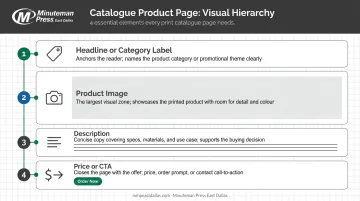
This visual hierarchy should stay consistent page to page. When layouts shift arbitrarily, the catalogue feels chaotic and buyers stop trusting it. Consistent structure builds trust — and trust keeps readers engaged.
Step 3: Apply Brand-Consistent Typography and Color
Keep typography simple: 2–3 typefaces maximum. One for headlines, one for body copy, and optionally a third for accent elements like pull quotes or callouts.
For color:
- Use your brand palette to segment categories and guide the eye
- Specify all brand colors in CMYK from the outset — not RGB. Colors that look perfect on screen can shift noticeably when printed if you haven't converted them correctly.
Lifestyle imagery can work well alongside product shots to connect the product to the reader's world, but it should complement product photography, not replace it.
Step 4: Prepare Print-Ready Files
This is where many first-time catalogue projects stall. File requirements aren't suggestions — files that don't meet these specs will either be rejected or produce poor results.
| Requirement | Standard |
|---|---|
| Image resolution | Minimum 300 DPI |
| Color mode | CMYK (not RGB) |
| Bleed | 0.125 in on all sides |
| Safe zone | 0.125–0.25 in inside trim edge |
| File format | PDF/X-1a or PDF/X-4 |
| Fonts | Embedded |
Review this checklist before submitting your files — catching issues at this stage saves reprints, delays, and added cost.
Catalogue Printing Specs: Formats, Paper, and Binding
These decisions determine how the finished catalogue looks and feels in the reader's hands. Understanding the basics before you talk to a printer saves time. A local full-service shop like Minuteman Press East Dallas can then walk you through options based on your goals and budget.
Size and Format
The most common catalogue sizes for business printing:
- 8.5" × 11" — the standard for product and trade catalogues; maximizes content per page
- 5.5" × 8.5" — compact, mailer-friendly, lower printing cost
- 6" × 9" — a middle-ground option used for service guides and editorial-style catalogues
- Square formats — common for fashion or lifestyle brands; distinctive but typically more expensive due to paper waste
Standard sizes cost less and waste less paper. Custom sizes can make a catalogue stand out, but they carry a price premium.
Paper Stock
The choice between coated and uncoated paper affects both how images reproduce and how the catalogue feels:
- Coated gloss: Sharp image reproduction, vibrant color — best for product-heavy catalogues
- Coated matte: Softer appearance, reduces glare — works well for premium or editorial feels
- Uncoated: Natural texture, better for text-heavy content; ink absorbs rather than sits on the surface
For covers, printers commonly offer heavier stock options (such as 80–100 lb cover weight) that give the catalogue a quality feel and protect interior pages. Interior pages typically use a lighter text stock. Minuteman Press East Dallas works with a range of coated and uncoated stocks — confirming the right weight for your project is worth a direct conversation.
Binding Options
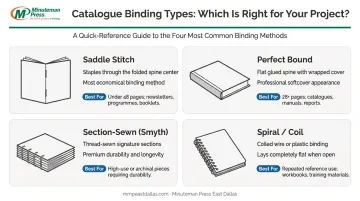
| Binding Type | Best For | Notes |
|---|---|---|
| Saddle stitch | Under ~48 pages | Economical; stapled through the spine |
| Perfect bound | 28+ pages | Flat glued spine; professional appearance |
| Section-sewn (Smyth) | Premium catalogues | Most durable; thread-sewn signatures |
| Spiral/coil | Reference catalogues | Lays flat; practical for repeated use |
For most small business catalogues, saddle stitch or perfect binding covers the majority of use cases. Minuteman Press East Dallas offers all four options, plus GBC/comb binding for reference-style formats.
Finishing Options
The right finish makes a cover noticeably more polished — and more memorable:
- Gloss or matte lamination — protects the cover and enhances the feel
- Soft-touch lamination — velvety texture that signals premium quality
- Spot UV — high-gloss coating applied to specific areas (logos, images) for contrast
- Foil stamping — metallic or holographic detail for standout impact
- Die-cutting — custom shapes or cutouts for distinctive presentation
These finishes pay off most when the catalogue needs to stand out in a direct mail stack or represent a higher-end brand. That tactile quality carries real weight: according to research from Domtar, 38% of recipients say physical mail properties influence how they feel about the sender — meaning what your catalogue feels like is part of your brand impression.
Minuteman Press East Dallas offers laminating, foil stamping, and die-cutting in-house.
What Affects the Cost of Catalogue Printing?
There's no flat rate for catalogue printing. Cost is calculated from a combination of variables, and understanding each one helps you make informed trade-offs while keeping quality intact.
Primary Cost Drivers
- Quantity: The single biggest lever. Press setup is largely a fixed cost, so the more units you print, the lower the per-unit cost. Doubling your quantity rarely doubles your bill.
- Page count: More pages mean more paper and more press time. Since page counts must be in multiples of 4, planning your content carefully avoids paying for blank pages.
- Paper stock: Heavier and coated stocks cost more than lighter uncoated options. The difference between standard 100 lb gloss text and premium uncoated stock can noticeably shift total cost.
- Binding method: Saddle stitching is the most economical. Perfect binding adds cost. Section-sewn binding costs more still.
- Finishing: Each special finish — lamination, foil, spot UV — adds to the per-unit cost. Applying premium finishes to the cover only (rather than interior pages) is a common way to get the premium look without paying for it throughout.
Digital vs. Offset Printing
The printing method matters, and the right choice depends on your quantity:
- Digital printing sends files directly to press with no plate setup, making it cost-effective for shorter runs. There's no minimum quantity penalty.
- Offset printing requires plate setup — a fixed upfront cost — but the per-unit cost drops substantially as quantity increases, making it the more economical choice at larger volumes.
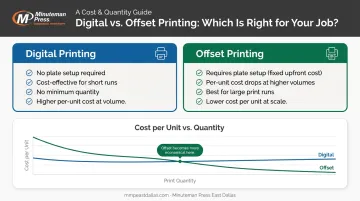
Digital makes sense for shorter runs; offset becomes more competitive as quantities grow. Where exactly that crossover falls depends on your specs — your printer can pinpoint it once they know the details of your job.
Get a Direct Quote
Online price calculators often can't account for design assistance, file preparation, local turnaround, or finishing combinations. Businesses in Dallas and the DFW area will get a more accurate budget by contacting Minuteman Press East Dallas directly at 214-660-7003. Their team can help optimize specs to fit your budget without cutting corners on quality.
Common Mistakes to Avoid in Catalogue Design and Printing
The most costly catalogue mistakes aren't discovered at the design stage — they show up on press day. Here are the issues that most frequently cause delays, added costs, or disappointing results.
Design-Side Mistakes
- Low-resolution images: Anything under 300 DPI will appear soft or pixelated in print. Screen images that look sharp at 72 DPI are not print-ready.
- Designing in RGB: RGB is the color mode for screens. Printing requires CMYK. The two color spaces don't map identically — colors that look vivid in RGB can appear duller or shifted when converted at the print stage.
- Missing or incorrect bleed: If your design extends to the edge of the page, it needs a ⅛ inch (0.125 in) bleed beyond the trim line. Without it, trimming produces a white border. Keep critical text and logos at least 0.125–0.25 inches inside the safe zone to avoid anything being cut off.
Structural and Planning Mistakes
- Burying key products: Buyers scan catalogues the same way they scan websites — from the front. Best-sellers and anchor products should appear early.
- Inconsistent layout grids: When every spread looks different, the catalogue feels chaotic. A consistent grid builds trust and makes navigation intuitive.
- Neglecting the cover: The cover is the first impression. A weak cover reduces the chance the catalogue gets opened at all. It deserves the most design attention and, often, the best finishing treatment.
Printing-Side Misunderstandings
A few cost and production assumptions that often trip up first-time catalogue buyers:
- Page counts must work in multiples of 4. A 17-page design will print as 20 pages — you're paying for those three blank pages regardless.
- More pages don't always cost significantly more — the quantity you print has a far larger impact on total cost than adding 4 pages.
- Applying specialty finishes only to the cover (rather than throughout) can deliver a premium feel at a fraction of the full-catalogue finishing cost.
Frequently Asked Questions
What is catalogue printing?
Catalogue printing is the professional reproduction of a multi-page bound document businesses use to present products, services, or information to customers. It ranges from simple saddle-stitched booklets to premium perfect-bound publications, typically running from 8 to 100+ pages.
How much does it cost to make a catalogue?
Costs vary based on quantity, page count, paper stock, binding, and finishing — there's no reliable flat rate. The most accurate way to budget is to contact Minuteman Press East Dallas directly with your specific specs for an accurate quote.
Can you still get printed catalogues?
Yes — printed catalogues are actively produced and in demand. According to the USPS Household Diary Study, 43% of households read catalogues they received — and physical catalogues consistently outperform digital-only campaigns for B2B purchasing, retail, and direct mail.
What is the best paper stock for catalogue printing?
Coated gloss or matte stocks are most common for product catalogues because they reproduce images sharply. Heavier cover stock (typically 80–100 lb) gives the catalogue a quality feel. The right choice depends on your content, audience, and budget.
How many pages should a product catalogue be?
Page count should reflect your content volume, always in multiples of 4. Common ranges are 8–24 pages for compact catalogues and 48–100+ for comprehensive product lines. More pages only make sense if the content justifies them.
What file format should I submit for catalogue printing?
Most professional printers require a print-ready PDF — ideally PDF/X-1a or PDF/X-4 — with 300 DPI images, CMYK color mode, 3mm bleed, and embedded fonts. Always verify specs directly with your printer before submitting — mismatched settings are the most common cause of reprints and production holdups.