
The confusion usually starts with a simple misunderstanding: what does "8.5 x 11" actually refer to? And why don't the three panels come out equal when you divide by three? This guide answers both questions and covers everything you need before submitting a file to print — unfolded vs. folded sizes, all standard dimensions, panel width calculations, fold line placement, bleed specs, and how to pick the right size for your project.
Key Takeaways
- The standard tri-fold size is 8.5" × 11" (flat), folding down to approximately 8.5" × 3.69"
- Panels are not equal — the front flap is slightly narrower (~3.625") to account for paper thickness
- Common flat sizes include 8.5"×11", 8.5"×14", and 11"×17", each yielding different panel dimensions
- Design files need 0.125" bleed on all sides and a 0.125" safe zone inside the trim edge
- Export files at 300 DPI as CMYK PDFs before sending to your printer
What Tri-Fold Brochure Dimensions Actually Mean
When a printer or template lists a size like "8.5" × 11"," that's the flat, unfolded sheet size — not the finished brochure you hand someone. This distinction trips up a lot of designers, and building your file around the panel size instead of the full sheet is one of the most common file setup errors.
The Physical Structure
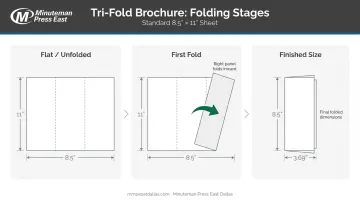
A tri-fold brochure is a single sheet folded twice. That creates 6 panels total — three on the front (outside), three on the back (inside). The fold sequence matters: the right panel folds inward first, then the left panel folds over it. This is what creates the nested, layered look of a finished brochure.
After folding, the height stays the same while the width compresses to roughly one-third of the flat sheet. For an 8.5" × 11" sheet, the folded dimensions come out to approximately 8.5" × 3.67"–3.69", depending on paper thickness.
Outside vs. Inside Spread
Understanding which spread you're designing matters for layout:
- Outside spread — contains the front cover, back panel, and inside flap (the panel that tucks in)
- Inside spread — the three panels fully visible when the brochure is opened flat
The fold lines on each spread are positioned slightly differently to account for paper thickness. In practice, the inner flap panel is typically 1/16"–1/8" narrower than the other two panels — enough clearance to prevent buckling when the brochure closes.
Standard Tri-Fold Brochure Sizes: A Complete Reference
Here's a full reference for the flat sheet sizes used in standard US tri-fold brochures, along with their folded dimensions and common applications.
Letter: 8.5" × 11"
The most widely used tri-fold format. According to multiple commercial print vendors, this sheet folds to approximately 8.5" × 3.69", with panels ranging from 3.625" to 3.6875" wide.
Why it's the default choice:
- Fits standard brochure rack pockets (typically 4" wide)
- Qualifies as a USPS self-mailer without an envelope
- Works for most businesses: retail, real estate, nonprofits, restaurants, events
Legal: 8.5" × 14"
The legal-size sheet folds to approximately 8.5" × 4.67", giving each panel noticeably more vertical space. That extra room makes it a practical choice for:
- Service guides and product listings
- Menus with multiple categories
- Information-dense designs where the letter format feels cramped
Tabloid: 11" × 17"
Folds to approximately 11" × 5.67", producing three wide panels that hold significantly more imagery or data. Best suited for:
- Restaurant menus requiring full visual spreads
- Event programs with detailed schedules or listings
- Projects where visual impact takes priority over compact size
Other Common Sizes
| Flat Size | Folded Size | Best For |
|---|---|---|
| 5.5" × 8.5" | ~5.5" × 2.83" | Compact handouts, small-run events |
| 9" × 12" | ~9" × 4" | Hospitality, corporate events, financial services |
| 11" × 25.5" | ~11" × 8.5" | Detailed guides, catalogs in brochure format |
The 11" × 25.5" deserves a closer look: each of its three panels measures roughly 8.5" × 11", making it the right call when your brochure needs to function more like a mini-catalog.
Understanding Fold Lines and Panel Widths
Here's the misconception that causes the most production problems: a tri-fold does not divide into three equal panels.
If you're working with an 8.5" × 11" sheet and you simply place fold lines at 3.667" intervals, the front flap won't tuck inside cleanly. It will buckle, or the closed brochure will have a visible white gap along the edge.
Why Panels Are Different Widths
When the brochure closes, the front flap (the panel that folds in first) has to wrap around the two panels underneath it. Paper has physical thickness. That means the outermost panel needs to be slightly narrower to compensate — otherwise there's nowhere for it to go without bowing.
For a standard 8.5" × 11" brochure, the correct panel widths are:
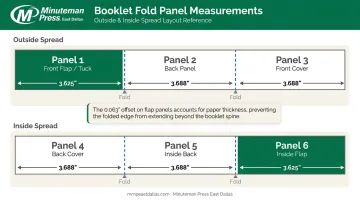
Outside spread (fold lines at ~3.625" and ~7.313"):
- Panel 1 (front flap/tuck): 3.625"
- Panel 2 (back panel): 3.688"
- Panel 3 (front cover): 3.688"
The inside spread mirrors this offset in reverse, because the spatial relationship between panels flips when you open the brochure:
Inside spread (fold lines at ~3.688" and ~7.376"):
- Panel 4: 3.688"
- Panel 5: 3.688"
- Panel 6 (inside flap): 3.625"
Heavier paper stocks need a slightly larger width differential, so the panel allowance adjusts based on paper caliper. This is another reason to confirm specs with your printer before finalizing your file.
Use a template from your print shop. Minuteman Press East Dallas provides pre-press support for customers in the Dallas-DFW area, with correct panel widths already built into the templates we provide.
How to Set Up Your Design File for Print
Bleed and Safe Zone
Bleed is the extra margin your design needs to extend beyond the trim edge so backgrounds and full-bleed images don't leave a white sliver after cutting. Standard requirement: 0.125" on all sides.
For an 8.5" × 11" sheet, your document with bleed should be set up at 8.75" × 11.25".
Safe zone (also called the live area) works the other way: keep text and logos far enough inside the trim line that they don't get clipped. Standard recommendation: 0.125" inside the trim edge on all sides, giving you an 8.25" × 10.75" safe zone on a letter-size sheet.
One note on fold lines: they're not cut lines, so design elements can cross panel boundaries on the inside spread. Do it deliberately — a headline spanning two interior panels can be an intentional design choice, or it can look like an error.
File Format and Color Mode
Before submitting your file:
- Resolution: 300 DPI minimum for all images
- Color mode: CMYK — the commercial print standard; RGB files can shift noticeably during conversion to print color
- File format: PDF (Press Quality or PDF/X-4 export from InDesign or Illustrator)
Minuteman Press East Dallas reviews every file before production. Order in person or by phone and a proof goes to your email for approval before anything runs on press — so spec questions get caught before they become costly.
Choosing the Right Tri-Fold Size for Your Needs
Start with two questions: How much content do you have? And how will this brochure be distributed?
By Content Volume
- 8.5" × 11" — the right default for most marketing handouts, company overviews, and event materials; panels are tight but workable for a focused message
- 8.5" × 14" or 11" × 17" — better when you have multiple products, a menu, or image-heavy layouts that feel squeezed on letter panels
- 11" × 25.5" — suited for detailed service guides or anything that functions like a leave-behind reference document
Mailing Considerations
The 8.5" × 11" tri-fold qualifies as a USPS self-mailer when it meets DMM 201 requirements: height 3.5"–6", length 5"–10.5", maximum thickness 0.25", and maximum weight 3 oz. It must also be sealed with two tabs (or equivalent) and include an addressing panel; it cannot be mailed loose.
USPS DMM 201 covers the full dimensional and sealing requirements for folded self-mailers.
Larger formats like the legal or tabloid size will typically require an envelope, which increases both postage and production costs.
Businesses in the Dallas area running brochure campaigns — trade shows, direct mail, in-store distribution — can work with Minuteman Press East Dallas to select the size, paper stock, and finish that fit the project's goals. The shop also handles the full mailing process: list building, printing, and USPS-compliant delivery from one place.
Frequently Asked Questions
What is the standard tri-fold brochure size?
The standard tri-fold brochure is printed on an 8.5" × 11" letter-size sheet, which folds down to approximately 8.5" × 3.69". It produces three panels on each side and fits standard brochure racks.
What is the legal tri-fold brochure size?
A legal tri-fold uses an 8.5" × 14" sheet and folds to approximately 8.5" × 4.67". It's the better choice when you need more panel space than the letter format provides, and it's common for menus, service guides, and content-heavy designs.
How many panels does a tri-fold brochure have?
A tri-fold brochure has 6 panels total — 3 on the outside and 3 on the inside — created by folding the sheet twice. Each fold creates a new panel division.
Why aren't tri-fold brochure panels equal in width?
The front flap must be slightly narrower (~3.625" vs. 3.688" on a letter sheet) to account for paper thickness. Without this offset, the flap buckles as it tucks inside the other panels and the closed brochure won't lie flat.
What bleed and safe zone should I use for a tri-fold brochure?
Most printers require 0.125" bleed on all sides, meaning your artwork extends beyond the trim edge to prevent white slivers after cutting. Keep critical content at least 0.125" inside the trim line to avoid cropping.
Can a tri-fold brochure be mailed without an envelope?
Yes — a standard 8.5" × 11" tri-fold can be mailed as a self-mailer if it meets USPS size, weight (max 3 oz), and sealing requirements. One panel is reserved for the address and postage. Larger formats typically require envelopes.