Introduction
Picture this: a visitor walks into a Dallas hotel lobby, spots a display rack near the front desk, and reaches for something that catches their eye. Whether it gets picked up or passed over often comes down to one decision made long before printing: size.
Many businesses make the mistake of designing first and checking dimensions later. The result? Print-ready files that don't match the specs, cards that don't seat correctly in display holders, or reprints that eat into the marketing budget.
Getting the size right from the start saves time, money, and frustration. What follows covers the two standard rack card sizes — 4" × 9" and 3.5" × 8.5" — including when to use each, what print specs to build into your file, and the sizing mistakes most worth avoiding before you place an order.
Key Takeaways
- 4" × 9" is the industry standard, fitting all standard display racks and slots into a #10 business envelope
- 3.5" × 8.5" is a compact alternative suited for minimal copy and simpler layouts, though rack compatibility should be confirmed before printing
- A larger 4.25" × 11" variant exists, but it won't fit all display systems
- Size affects rack fit, layout space, and print cost — not just how the card looks
- Always confirm bleed (0.125" on all sides) and safe zone specs before submitting files
What Is a Rack Card and Why Size Matters
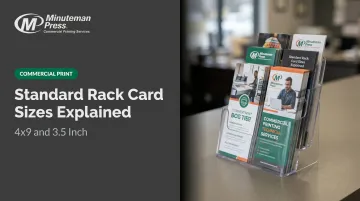
A rack card is a single-panel, unfolded print piece designed to stand upright in a display rack, counter holder, or brochure stand. It doesn't fold like a brochure, and unlike a postcard or flyer, it's sized specifically for a display slot — tall, narrow, and built to fit standard rack hardware.
That fit matters. Rack cards must fit standardized display hardware found in hotel lobbies, restaurant waiting areas, visitor centers, and retail lobbies across the DFW area. A card that's too wide won't slide into the pocket. Too short, and it gets lost behind taller pieces from competitors.
Where rack cards sit in the print toolkit:
| Format | Folded? | Typical Size | Primary Use |
|---|---|---|---|
| Rack Card | No | 4" × 9" | Display stand promotions |
| Brochure | Yes | Varies | Detailed information |
| Postcard | No | 4" × 6" | Direct mail |
| Flyer | No | 8.5" × 11" | Event or bulletin posting |
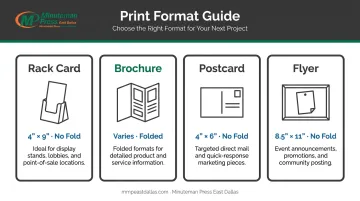
Size isn't an aesthetic preference — it's a hardware compatibility decision.
The Two Standard Rack Card Sizes Explained
Custom sizes exist, but two dimensions dominate because they were built around the physical constraints of standard display rack slots. Here's what separates them.
The 4" × 9" Rack Card (Industry Standard)
PrintingForLess identifies 4" × 9" as the standard rack card size, and AlphaGraphics calls it the most common size that fits most standard holders. The dimensions work for a specific reason: a standard brochure rack slot is designed around 4-inch-wide literature, and at 9 inches tall, the card maximizes vertical real estate without overhanging the pocket.
A 4" × 9" card also fits inside a standard #10 business envelope (4⅛" × 9½"), making it a practical mailer insert for businesses running both in-person display and direct mail campaigns.
Industries where 4" × 9" performs best:
- Tourism and hospitality (hotel lobbies, visitor centers)
- Restaurants promoting specials or seasonal menus
- Real estate agents showcasing property listings
- Nonprofits running fundraising or awareness campaigns
- Retail businesses distributing seasonal promotions
One layout rule specific to this size: the top 3 inches are the only inches that matter at first glance. According to 4OVER4, that top third is the portion visible when cards sit in a rack — everything below is hidden by the display slot. Your headline, logo, and primary offer must live in those first 3 inches. Treat it as a constraint built into the format, not a design preference.
For businesses distributing across multiple venues in Dallas, Garland, or Mesquite, 4" × 9" is the safest default because holder compatibility is essentially universal.
The 3.5" × 8.5" Rack Card (Compact Format)
UPrinting lists 3.5" × 8.5" alongside 4" × 9" as its two standard rack card sizes, describing it as a compact option. 48HourPrint also offers both. The trade-off is straightforward: slightly less layout space, potentially lower print cost in bulk, but narrower rack compatibility.
Because most display hardware is engineered for 4-inch-wide pieces, a 3.5" × 8.5" card can sit loosely or off-center in some holders. Before ordering this size for distributed placement — especially across multiple venues — physically verify or confirm the holder dimensions at each location.
Where 3.5" × 8.5" works well:
- Appointment reminder cards for salons or clinics
- Event promotions with minimal copy
- Church outreach cards
- Service menus with one or two offerings
- Brands with a clean, minimalist visual identity
One underappreciated advantage: in a rack full of standard 4" × 9" cards, a 3.5"-wide card creates a sliver of white space on either side. That visual gap can pull the eye in a crowded display. Once you've confirmed holder compatibility, it becomes a subtle differentiator rather than a liability.
How to Choose Between 4" × 9" and 3.5" × 8.5"
Four factors drive the right choice: content density, distribution method, brand style, and budget. When in doubt, start with 4" × 9" — it eliminates rack compatibility risk before you've spent anything on design or print.
Content and Layout Needs
If your design includes multiple images, a service list, a map, QR code, and contact details, you need the 4" × 9" canvas. Trying to fit all of that into a 3.5" × 8.5" format produces visual clutter or requires text small enough to lose readability.
If the card carries a single offer, one event date, or just contact information, 3.5" × 8.5" is sufficient — and the reduced space actually enforces the kind of editorial discipline that makes cards more effective.
Distribution Method and Rack Compatibility
This is the most practical filter. Ask one question before committing to a size: do all the display racks at your intended venues accommodate this format?
- 4" × 9" fits virtually every standard holder
- 3.5" × 8.5" requires verification at each location
For businesses planning distribution across multiple hotels, restaurants, or visitor centers in the DFW area, standardizing on 4" × 9" avoids the logistical problem of discovering mismatched hardware after printing.
Budget, Brand Style, and Print Volume
Smaller cards use less paper, which reduces per-piece cost at high volumes. The difference is modest at runs under 500 but grows meaningfully at 1,000+ pieces. Call Minuteman Press East Dallas at 214-660-7003 for pricing across quantity tiers.
Brand style also plays a role. Image-heavy or multi-service businesses get more from the 4" × 9" canvas. Minimalist or single-offer brands often look sharper in the tighter 3.5" × 8.5" format, where white space does more of the work.
For first-time rack card buyers, confirming size and specs before printing is the easiest way to avoid costly reprints.
Print Specs and Design Considerations
Choosing the right size is only half the job. A file submitted with wrong dimensions, missing bleed, or text too close to the edge still results in delays and wasted spend.
Bleed, Safe Zone, and Trim Specs
AlphaGraphics requires 0.125" bleed on each edge for rack cards, and PrintingForLess places the safe zone at least 1/8 inch inside the trim line. These specs apply to both standard sizes.
Build your file this way:
- Set document size to finished dimensions plus 0.125" bleed on all four sides
- Keep all critical content — text, logos, phone numbers, QR codes — at least 0.125"–0.25" inside the trim edge
- Use the exact template for your chosen size (UPrinting provides separate vertical templates for 3.5" × 8.5" and 4" × 9")
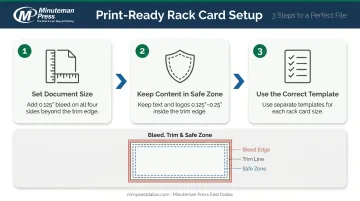
Before submitting files, confirm the exact specifications with Minuteman Press East Dallas. Their team sends a graphic proof via email for approval before production begins.
Paper Stock and Finish Options
Rack cards need to stand upright in a display holder without bending or curling. Minuteman Press East Dallas offers 14pt C1S/C2S and 16pt C1S/C2S as standard cardstock options for rack cards — both vendor-supported weights that provide the rigidity a display environment requires.
Additional stock options include:
- 80# and 100# uncoated cover
- 80#, 100#, and 120# gloss cover
The right finish depends on your design and how recipients will use the card:
| Finish | Best For |
|---|---|
| Gloss/UV coating | Tourism and hospitality; vibrant colors; fingerprint resistance |
| Matte finish | Text-heavy designs; softer visual tone |
| Uncoated stock | Appointment cards; any design where the recipient may need to write on it |
Orientation
Vertical (portrait) orientation is the standard for rack cards — it matches the shape of the display slot. Horizontal designs are possible but create seating and visibility problems in most holders. Build all templates in portrait orientation from the start; switching later requires a full redesign, not a simple rotation.
Common Rack Card Sizing Mistakes to Avoid
Designing Before Confirming Rack Dimensions
Not all display stands accommodate both standard sizes. Measure or confirm the holder slot dimensions at your intended distribution locations before locking in a size. Discovering a mismatch after printing is an expensive fix.
Ignoring the Top-Third Visibility Rule
Placing your primary message in the middle or bottom of the card means it's hidden when the card sits in a rack holder — the most common layout error in rack card print jobs. Headline, logo, and core offer go in the top 3 inches. No exceptions.
Treating Both Sizes as Interchangeable
Switching from 4" × 9" to 3.5" × 8.5" (or vice versa) after a design is complete isn't a simple rescale. Resizing distorts image proportions, shifts text into unsafe zones, and breaks layout grids.
The correct approach is to rebuild the layout from scratch using the right template:
- Each size has its own bleed requirements
- Safe zones differ between the two formats
- Text and image placement must be repositioned, not just scaled
Treat them as separate design projects, not variations of the same file.
Frequently Asked Questions
What size is a standard rack card?
The industry standard is 4" × 9" — it fits virtually all standard brochure rack holders and also fits inside a #10 business envelope. The most common alternative is 3.5" × 8.5", a compact option suited for simpler designs with verified rack compatibility.
What is the difference between a 4×9 and a 3.5×8.5 rack card?
The 4" × 9" offers more design room and fits all standard rack holders without compatibility concerns. The 3.5" × 8.5" is narrower and better for minimal copy, but verify holder dimensions before distributing across multiple venues.
What paper stock is best for rack cards?
14pt or 16pt cardstock (C1S or C2S) is the standard recommendation for rack card printing. Both weights provide the rigidity needed to stand upright in a display holder. Finish choice (gloss, uncoated, UV) depends on use case and whether recipients need to write on the card.
Can rack cards be used for direct mail?
A 4" × 9" card fits inside a standard #10 business envelope (4⅛" × 9½"), making it a practical mailer insert. Sending it bare without an envelope may not qualify for standard USPS postcard automation pricing, so confirm postal requirements before finalizing your design.
What bleed settings should I use when designing a rack card?
Standard bleed is 0.125" on all sides, with critical design elements kept at least 0.125"–0.25" inside the trim edge. Always confirm exact specs with your printer before submitting files, as requirements can vary by vendor and production method.
How many rack cards should I print for my business?
Print pricing is volume-based, so cost per piece drops as quantity increases. Contact Minuteman Press East Dallas at 214-660-7003 for pricing across quantity tiers and help finding the breakpoint where a larger run makes financial sense.